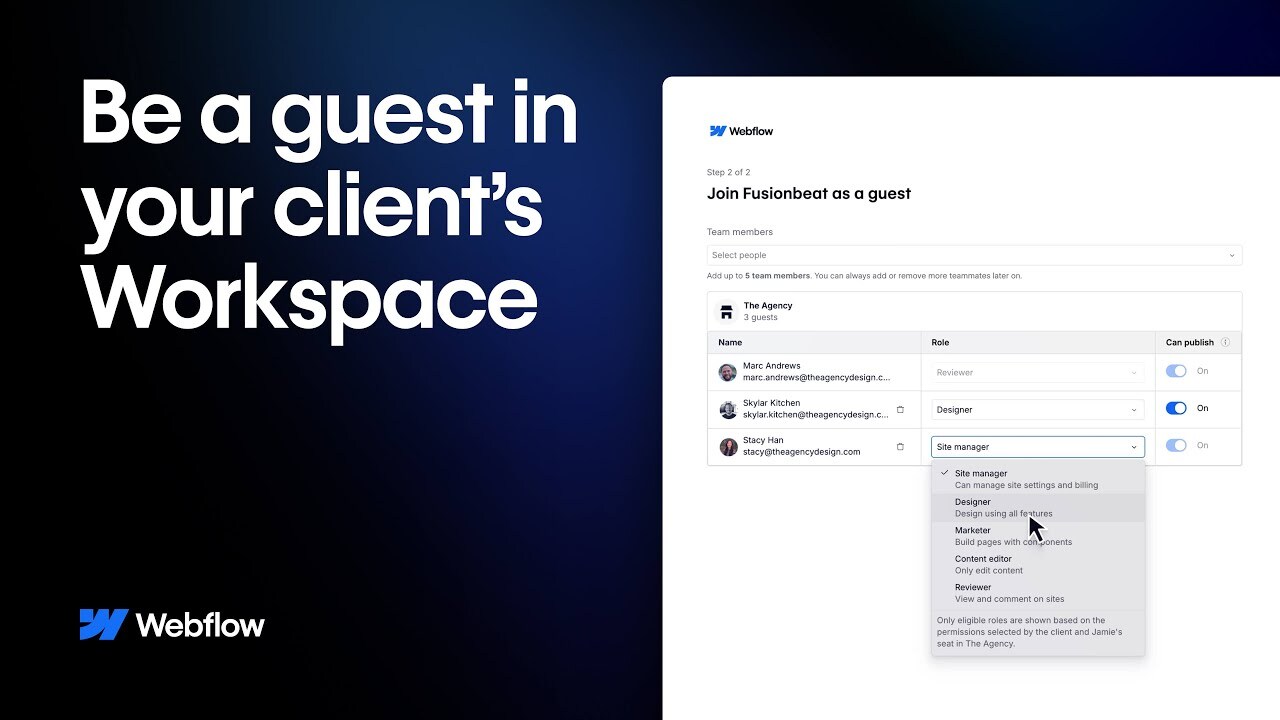

For agencies working across multiple client Webflow Workspaces, Guest role just got a serious upgrade. Whether you're managing dozens of active projects or jumping in to support an existing client site, the new Guest role enhancements make it easier to collaborate - clearly, efficiently, and with full confidence on both sides.
Now you can request access directly from your Webflow dashboard, manage permissions for your team, and work within your client's Workspace - all without transferring sites or compromising oversight.
In this video, we'll walk through how your agency can:
🔹 Request guest access to any client Workspace
🔹 Assign roles and permissions to your team members
🔹 Accept secure invites from clients when needed
🔹 Offboard cleanly when the engagement ends
For clients, Guest role provides full control and transparency. You decide who gets access, what they can do, and which sites they can see - without ever handing over passwords or ownership.
Guest role is designed for modern agency workflows - enabling trusted partnerships without friction or risk. It's the simplest, clearest way to work inside your client's Webflow environment and is just one part of Webflow's Web Experience Platform.
----------
Get started with Webflow: https://wfl.io/2r7cVUW
Join the Webflow Community: https://webflow.com/community
https://webflow.com
https://twitter.com/webflow
https://www.instagram.com/webflow
https://facebook.com/webflow
#Webflow
#GuestRole
#AgencyTools
#ClientAccess
#webdesign
#AgencyWorkflow
#digitalcollaboration
#WorkspacePermissions